
The surface of an injection molded part is largely determined by the mold cavity. A polished cavity produces a smooth or glossy surface, while a textured cavity transfers its grain directly onto every molded part.
Mold-Tech textures are used to create fine matte, sand-like, leather-like, geometric, and decorative surfaces. The chosen texture affects appearance, touch, draft angle, mold preparation, part release, and tooling cost. A texture that looks suitable on a sample plate may still cause molding problems when the part has deep walls, insufficient draft, internal surfaces, or difficult ejection directions.
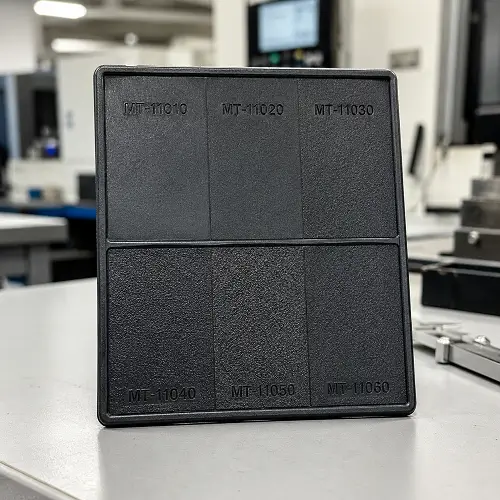
MT-11010 through MT-11060 are commonly compared when a product needs a matte or sand-like surface. These six textures cover several levels of visible grain, but their numbers should not be treated as a simple fine-to-coarse scale. MT-11050, for example, has a greater published reference depth than MT-11060.
What Is Mold-Tech Texture?
Mold-Tech is a branded texture system used on injection molds and other production tooling. The required pattern is engraved into the mold surface, normally through chemical etching or laser texturing.
During injection molding, molten plastic fills the small peaks and valleys in the cavity surface. After cooling, the molded part reproduces the texture. This means Mold-Tech texture is not a coating or secondary surface treatment added after molding. It is built into the mold and repeated during each production cycle.
The final result still depends on more than the texture code. Resin type, color, mold temperature, melt temperature, packing pressure, wall thickness, flow direction, and mold condition can all affect how the pattern and gloss appear on the finished part.
Why Use Texture on Injection Molded Parts?
A smooth molded surface is not suitable for every product. It may appear too glossy, show reflections clearly, or make small cosmetic variations more visible.
A suitable mold texture can reduce glare, create a controlled matte appearance, add grip, and give large plastic surfaces more visual character. Texture is commonly used on electronic housings, appliance panels, automotive interior parts, equipment covers, handles, controls, and consumer products.
Texture can also reduce the visibility of light scratches, minor flow variation, and small cosmetic differences. It should not be used as a substitute for correcting sink marks, burns, short shots, severe weld lines, warpage, or unstable molding conditions. These problems need to be addressed through part design, mold design, material selection, and process control.
Mold-Tech vs. SPI and VDI Finishes
Mold-Tech, SPI, and VDI all describe mold surfaces, but they do not represent the same type of finish.
SPI finishes mainly classify polished mold surfaces. They range from high-gloss diamond-polished finishes to duller stone- or blasted surfaces.
VDI finishes are associated with controlled surface roughness levels, often produced through EDM or similar mold-finishing processes.
Mold-Tech textures identify specific surface patterns. Depending on the selected code, the result may be a fine matte texture, coarse grain, leather pattern, wood grain, geometric design, or custom decorative surface.
A drawing note that only says “matte finish” leaves room for different interpretations. Specifying an exact Mold-Tech number gives the mold maker and customer a clearer reference. A physical sample plaque is still recommended because photographs cannot accurately show texture scale, gloss, or touch.
Mold-Tech MT-11010 to MT-11060 Texture Chart
The values below are commonly published design references. They can help during early product development, but they should not be treated as guaranteed draft requirements for every molded part.
| Mold-Tech texture | Reference depth | Reference draft | General appearance |
|---|---|---|---|
| MT-11010 | 0.0010 in / 0.0254 mm | 1.5° | Fine, subtle matte |
| MT-11020 | 0.0015 in / 0.0381 mm | 2.5° | Medium-fine matte |
| MT-11030 | 0.0020 in / 0.0508 mm | 3° | Visible sand-like texture |
| MT-11040 | 0.0030 in / 0.0762 mm | 4.5° | Pronounced grain |
| MT-11050 | 0.0045 in / 0.1143 mm | 6.5° | Deep, coarse texture |
| MT-11060 | 0.0030 in / 0.0762 mm | 4.5° | Distinct coarse pattern |
For a subtle matte appearance, MT-11010 and MT-11020 are normally the first options to compare. MT-11030 creates a more visible sand-like surface, while MT-11040 provides a stronger grain. MT-11050 has the greatest published reference depth in this group and usually requires the most draft. MT-11060 should be selected by looking at its actual pattern rather than assuming it is deeper than MT-11050.
Texture depth is also different from surface roughness, Ra. Two textures can have the same nominal depth but different feature shapes, spacing, density, and visual appearance.
MT-11010: Fine Matte Texture
MT-11010 creates a fine and relatively subtle matte surface. It reduces the reflective appearance of a smooth mold without making the grain a dominant product feature.
This texture is suitable for electronic housings, control panels, appliance components, interior covers, and other parts that need a clean low-gloss appearance. It is also useful when the product includes small lettering or nearby details that could lose clarity beside a deeper texture.
Its published reference depth is approximately 0.0254 mm, with about 1.5° of draft used as an early design reference. Deeper walls, internal surfaces, and materials that shrink tightly around a core may still require more draft.
MT-11020: Medium-Fine Matte Texture
MT-11020 produces a more visible matte finish than MT-11010 while keeping the grain relatively fine and uniform. It provides stronger visual coverage without creating an obviously coarse surface.
It is often considered for equipment housings, handheld devices, appliance panels, automotive interior components, and molded covers. The texture works well when MT-11010 appears too smooth under direct lighting but MT-11030 would be more pronounced than the product design requires.
The published reference depth is approximately 0.0381 mm, with around 2.5° of draft. It offers a practical middle ground between a light matte finish and a clearly visible sand-like texture.
MT-11030: Noticeable Sand-Like Texture
MT-11030 creates a more obvious sand-like surface. The texture is easier to see and feel than MT-11010 or MT-11020, giving the part a deliberately textured appearance rather than only reducing gloss.
Common applications include tool housings, equipment covers, handles, appliance parts, automotive trim, and medium-sized product enclosures. It can provide more tactile definition and make minor cosmetic variation less noticeable.
Its reference depth is approximately 0.0508 mm, with about 3° of draft commonly used during early design. Logos, small text, narrow recesses, and sharp texture boundaries should be reviewed before this texture is applied across the entire cosmetic surface.
MT-11040: Pronounced Grain Texture
MT-11040 has a stronger surface relief and a clearly visible grain. It is more noticeable from a normal viewing distance and produces a firmer tactile effect than MT-11030.
This texture can suit industrial housings, power-tool components, automotive interior parts, equipment panels, and protective covers. It is normally selected when the texture needs to become part of the product’s visual design rather than remain in the background.
The published reference depth is approximately 0.0762 mm, with around 4.5° of draft. Deep walls, internal surfaces, sliders, lifters, and narrow cavities require careful review because insufficient draft can cause scuffing or drag marks during ejection.
MT-11050: Deep Coarse Texture
MT-11050 has the greatest published reference depth among these six options. It creates a deep, coarse surface with strong visual and tactile character.
It may be suitable for large industrial surfaces, automotive components, handles, covers, and parts where a fine matte texture would appear too weak. The product geometry should be designed around the texture because the required wall angle may noticeably affect dimensions and appearance.
Its reference depth is approximately 0.1143 mm, with about 6.5° of draft commonly listed. Adding MT-11050 after the part design has already been finalized can lead to significant CAD and tooling changes.
Small lettering, narrow slots, deep ribs, bosses, shut-offs, and tight internal areas should normally be kept away from this texture unless the mold design has been reviewed specifically for it.
MT-11060: Distinct Coarse Pattern
MT-11060 should not be described as a deeper version of MT-11050. Its published reference depth is approximately 0.0762 mm, which is less than MT-11050 and similar to MT-11040.
The main difference is the pattern itself. Feature shape, spacing, and distribution can make MT-11060 look different even when its nominal depth is similar to another texture.
Its reference draft is approximately 4.5°, although the actual requirement still depends on part depth, shrinkage, ejection direction, and resin behavior. MT-11060 should be selected by comparing a physical sample with MT-11040 and MT-11050 under the intended lighting conditions.
How Texture Depth Affects Draft Angle
Draft is the angle added to a molded wall so the part can release from the mold. A smooth wall can often release with relatively little draft. A textured wall contains small peaks and valleys that resist sliding during ejection.
As texture depth increases, insufficient draft can cause:
- Drag or scrape marks
- Gloss streaks in the release direction
- Damage to the molded grain
- Part distortion
- Stronger ejector marks
- Parts sticking to the core or cavity
- Premature wear on the textured mold surface
A commonly used Mold-Tech starting guideline is approximately 1° of draft for every 0.0005–0.0006 inch of texture depth. This is only a general reference.
The direction of material shrinkage also matters. An external wall may shrink away from the cavity surface, while an internal wall normally shrinks around the mold core. Because the plastic grips the core, an internal textured wall can require considerably more draft than an exterior wall with the same texture.
One common DFM problem appears when a deeper texture is selected after the product geometry has already been approved. A wall angle that is acceptable for a polished or lightly textured surface may not be enough for MT-11040 or MT-11050. The design then needs to be modified before mold manufacturing or texturing begins.
Slides, lifters, and side-action components must be checked according to their own direction of movement, not only the main mold-opening direction.
How Material, Color, and Molding Conditions Affect Appearance
A Mold-Tech number identifies the intended pattern, but it does not guarantee that every resin and color will produce the same appearance.
ABS commonly reproduces matte textures clearly and is often used for texture sample plaques. PC, PP, PA, PBT, TPE, glass-filled materials, and mineral-filled plastics can show the same mold texture differently because of their flow, shrinkage, filler content, and surface behavior.
Glass fibers may create visible flow orientation or uneven gloss. Texture can reduce the contrast of these marks, but it may not remove them completely.
Color also changes how a texture is perceived. Black and other dark colors tend to show highlights, dust, scratches, and gloss variation more clearly. Light colors may reduce some contrast but can make contamination or discoloration easier to see.
Clear or translucent plastics react differently because light passes through the material as well as reflecting from the surface. A texture approved on a black ABS plaque should not be assumed to look identical on transparent PC.
Texture depth and gloss are related, but they are not the same measurement. A deeper texture often appears less glossy, although the final gloss can still change with:
- Mold temperature
- Melt temperature
- Packing pressure
- Wall thickness
- Flow direction
- Resin grade
- Mold release agents
- Surface treatments
- Process stability
A critical cosmetic part should be approved using production-intent resin, color, and molding conditions rather than a photograph or a sample molded from a different material.
Mold Design Requirements for Textured Parts
Texture selection must be reviewed together with the mold design. Some surfaces are easy to texture and release, while others can create manufacturing or ejection problems.
Deep and Internal Walls
The deeper the wall, the farther the textured plastic must slide before clearing the mold. A deep wall can therefore need more draft than the basic texture chart suggests.
Internal walls are usually more difficult because the plastic shrinks around the core. Applying a coarse texture to a deep internal surface without sufficient draft can cause severe drag marks or make the part difficult to eject.
Ribs, Bosses, and Narrow Areas
Structural ribs and bosses normally do not need decorative texture unless they remain visible on the finished product. Narrow pockets, closely spaced bosses, and deep ribs may also be difficult to texture consistently.
Texture around these features can increase release resistance and make mold preparation more complicated. Hidden structural areas are often kept smooth.
Shut-Off and Sealing Surfaces
Texture should not extend onto mold shut-offs, sealing areas, sliding contact surfaces, assembly fits, or other dimensions that need close control.
These areas are normally marked as no-texture zones on the 2D drawing or texture map.
Parting Lines and Texture Boundaries
The point where a texture stops can be visible on the molded part. Texture boundaries should follow natural product lines, changes in geometry, or other locations where the transition is less noticeable.
A poorly located boundary can create an obvious line or an inconsistent appearance between adjacent surfaces. In some cases, texture depth can be faded gradually, but this needs to be discussed before engraving.
Logos and Text
Fine letters, symbols, and logos may lose definition beside a deep texture. A smooth border, reduced texture depth, or clearly marked no-texture area may be needed around critical text.
Regulatory markings, assembly labels, and small icons should be checked before the final texture is approved.
How to Choose the Right Mold-Tech Texture
The deepest texture is not automatically the best choice. Selection should begin with the required product appearance and then be checked against the available draft and mold geometry.
MT-11010 and MT-11020 are more suitable when the product needs a clean, understated matte finish. MT-11030 creates a visible sand-like texture without becoming as aggressive as MT-11040 or MT-11050.
MT-11040 and MT-11050 are better suited to products where the grain should be clearly visible and felt. These options require more attention to draft, internal walls, texture boundaries, and ejection.
MT-11060 should be selected according to its actual grain rather than its number. Comparing the physical samples is more useful than comparing only the published depths.
Product use should also be considered. A coarse texture may improve grip and hide light wear, but its deeper valleys can collect dust, grease, cleaning products, or cosmetic residue. Medical, laboratory, food-contact, and frequently cleaned parts may need a finer surface that is easier to wipe and inspect.
Website photographs and CAD renderings cannot accurately reproduce texture scale or touch. Physical sample plaques should be viewed from several angles and under lighting similar to the final application.
How to Specify Mold Texture on a Drawing
A complete texture specification should allow the customer, mold maker, texture supplier, and molding factory to understand the same requirement.
The drawing or texture map should identify:
- Exact Mold-Tech number
- Surfaces that require texture
- Surfaces that must remain smooth
- Texture boundary locations
- Plastic material and color
- Draft angle
- Grain direction when relevant
- Gloss requirement when controlled
- Approved sample plaque
- Whether equivalent textures are acceptable
- Appearance approval requirements
A basic drawing note can be written as:
Texture: Mold-Tech MT-11030 on designated cosmetic surfaces only. Keep shut-offs, sealing surfaces, lettering, and marked no-texture areas free of texture. Final appearance requires approval using production material and color.
When the original Mold-Tech pattern is mandatory, avoid adding “or equivalent.” A locally copied texture may look generally similar but differ in depth, scale, density, gloss, and repeatability.
Confirm Texture Before Mold Engraving
Texture is easier and less expensive to approve before it is applied to the production mold.
The normal review should confirm the CAD model, draft angle, ejection direction, Mold-Tech number, resin, color, texture boundaries, no-texture areas, and approved sample plaque.
Before engraving, the mold surface must be prepared correctly. EDM scale, cutter marks, burns, polishing variation, weld repairs, and other surface defects can remain visible after texturing if they are not removed.
The first molded samples should be checked for pattern consistency, gloss variation, drag marks, boundary quality, parting-line appearance, lettering clarity, color consistency, and ejection damage.
Production should begin only after the customer has approved the molded texture sample. Approval based only on a photograph or texture catalog is risky, especially for large cosmetic parts.
Common Mold Texture Mistakes
Selecting texture from a photograph only is one of the most common problems. Lighting, camera angle, image compression, display brightness, material, and color can all change how the same texture appears.
Assuming higher MT numbers always mean deeper texture can also lead to the wrong choice. MT-11050 has a greater reference depth than MT-11060, so the codes must be treated as pattern identifiers rather than a universal roughness scale.
Choosing the texture after mold design may reveal that the part does not have enough draft. Deep textures can require changes to wall angles, internal features, or texture boundaries.
Using texture to hide major molding defects does not solve the original problem. Sink marks, deep weld lines, warpage, burns, and poor filling still require design or process changes.
Ignoring resin and color during approval can result in a production part that looks different from the selected plaque. The same texture may appear softer, sharper, glossier, or less uniform on another plastic.
Applying texture to every visible and hidden surface increases tooling difficulty without always improving the product. Structural ribs, bosses, sealing areas, shut-offs, and assembly fits usually need separate treatment.
Does Mold Texture Increase Tooling Cost?
Mold-Tech texturing adds another tooling operation after the relevant cavity and core surfaces have been machined and prepared.
The additional cost and lead time depend on the texture pattern, depth, total area, mold size, number of inserts, surface accessibility, masking requirements, texture boundaries, and required gloss control.
A fine matte texture on one accessible cavity surface is normally easier to complete than a deep pattern covering several inserts, sliders, curved areas, and sharply defined boundaries.
Late texture changes can be expensive. Removing or reducing an existing texture may require polishing, welding, re-machining, surface preparation, and re-engraving. Selecting the texture and checking the draft before mold manufacturing helps control both tooling cost and project timing.
Conclusion
Mold-Tech texture affects far more than the appearance of an injection molded part. It influences draft angle, ejection, gloss, mold preparation, tooling cost, and the way the finished part feels in use.
MT-11010 and MT-11020 provide finer matte surfaces. MT-11030 creates a more visible sand-like texture, while MT-11040 produces a stronger grain. MT-11050 is the deepest option in this group and generally requires the most draft. MT-11060 has a different coarse pattern and should not be treated as a deeper continuation of MT-11050.
Published texture depths and draft angles are useful design references, but the final requirement must be checked against the part geometry, wall depth, ejection direction, plastic material, color, and molding conditions.
Before mold engraving, confirm the Mold-Tech number with a physical plaque and clearly mark the texture areas, boundaries, and no-texture surfaces on the drawing.
For a textured injection molding quotation, provide the 3D CAD model, 2D drawing, resin grade, color, Mold-Tech number, marked texture areas, cosmetic requirements, and estimated production quantity. JeekMould can review the draft, mold structure, texture feasibility, and injection molding requirements before tooling begins.